Last Updated on September 17, 2026 by Lydia — Salles & Co. Digital
Disclosure: This article (WebinarJam Review)contains affiliate links. If you sign up through one of them, we may earn a commission at no extra cost to you. Our editorial opinions remain our own.
TL;DR
WebinarJam is a live webinar platform built for one job: running real-time presentations that end in an offer. It’s not new and it’s not AI-powered, but for creators who need a reliable live room with registration, reminders, and in-webinar offers baked in — and, from the Basic plan up, automated replays through its sister tool EverWebinar — it still covers the fundamentals well. It works best as one piece of a larger funnel, not as a standalone growth tool.
What Is WebinarJam?
WebinarJam is a cloud-based live webinar platform built by Genesis Digital, the same company behind Kartra and EverWebinar. Launched over a decade ago, it was one of the first tools designed specifically for marketing webinars rather than internal meetings — the kind where a registration page, a countdown, an email sequence, and a pitch at the end all matter as much as the video itself.
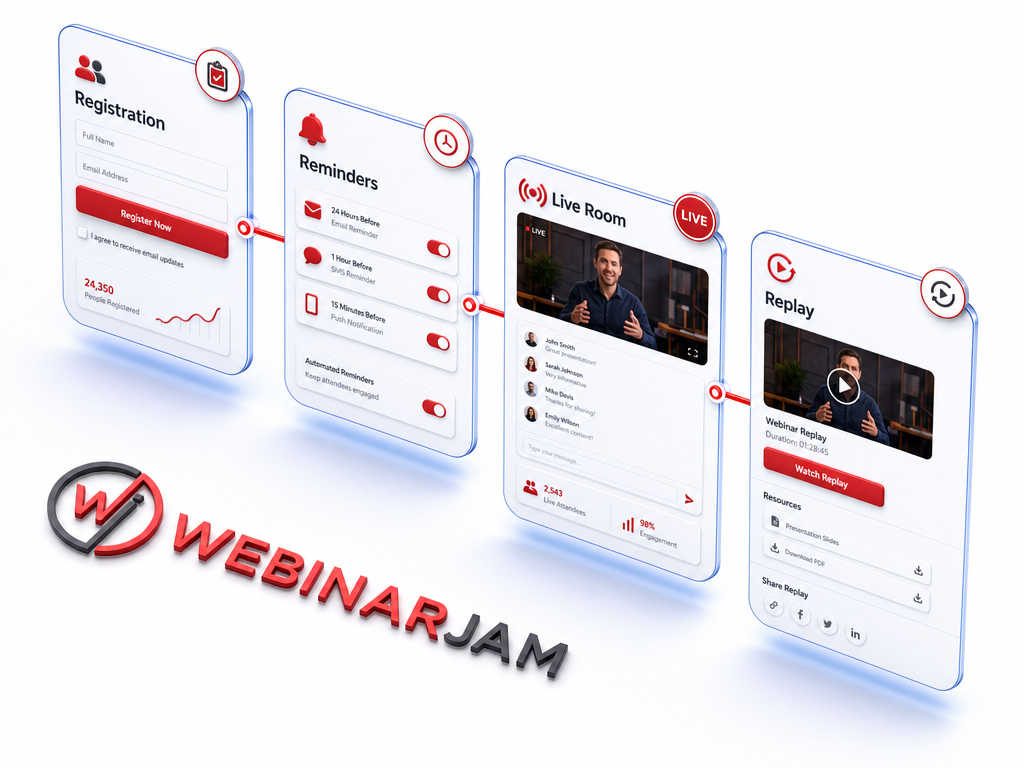
The platform handles the full lifecycle of a live event: a customizable registration page, automated email and SMS reminders, the live broadcast room itself (with chat, polls, and handouts), and a replay page afterward. It supports up to 5,000 attendees and six presenters depending on the plan, and everything runs in the browser — no downloads required for attendees.
Here’s the detail that matters most for how this tool fits into a funnel: from the Basic plan upward, WebinarJam includes Automated Webinars through EverWebinar at no extra cost. Only the entry-level Starter plan is live-only. That changes the usual framing of “WebinarJam vs. EverWebinar” — for most paying customers, it’s not really a choice between the two, it’s a question of which plan tier unlocks both.
The Scenario Where WebinarJam Actually Makes Sense
Picture a course creator who has just finished building an offer. They have an email list, a rough pitch deck, and a hypothesis about what will make people buy — but no proof yet. Running that pitch cold, in front of a live audience, is the fastest way to find out if it lands. Questions in the chat reveal objections nobody anticipated. Drop-off points during the presentation show exactly where attention fades. A live Q&A surfaces the actual language customers use when they’re skeptical.
This is the validation stage, and it’s where live webinars fit into your sales funnel before anything gets scaled up. Once the pitch is tested and refined through a handful of live runs, that same recording can be pushed into an automated, on-demand format using EverWebinar — a transition that’s noticeably smoother here than switching between two unrelated vendors, since both products share the same account and infrastructure on Basic plans and above. WebinarJam is built for that first phase: proving the pitch works before letting it run on autopilot.
How WebinarJam Works
Setting up a webinar in WebinarJam follows a fairly linear flow:
- Create the registration page using one of the built-in templates, or connect an external landing page.
- Set the schedule — a single date, a recurring series, or a “just in time” option that starts shortly after signup.
- Configure reminders across email and SMS, which is one of the platform’s stronger built-in features compared to bare-bones alternatives.
- Run the live room, where hosts can share screens, inject pre-recorded video segments, drop time-sensitive offers on screen, run polls, and moderate chat in real time.
- Deliver the replay automatically to registrants who didn’t attend live, with the same offer stack still active — or, on Basic and above, hand that same recording off to EverWebinar to run on a recurring automated schedule.
None of this is technically difficult, though the menus and workflows feel closer to 2016 SaaS design than 2026 SaaS — functional, but visibly older than platforms like Demio or StealthSeminar.
Who WebinarJam Is For
- Course creators and coaches validating a new offer. If the pitch hasn’t been tested live yet, this is the right tool for that stage.
- Marketers running product launches with a defined start and end date. The registration-to-replay pipeline is built exactly for launch windows.
- Teams that want live and automated webinars under one roof. From Basic up, EverWebinar’s automation is bundled in, so there’s no separate purchase or separate login to manage.
- Presenters who need multi-host, large-audience support. Up to six hosts and 5,000 attendees on the top plan covers most mid-size launches without needing an enterprise-grade platform.
Who WebinarJam Is NOT For
- Creators on the Starter plan expecting automation. The entry tier is live-only — automated/evergreen webinars only unlock from Basic ($99/mo) upward. Anyone planning to automate later should budget for at least the Basic tier from the start.
- Budget-conscious solo creators running small webinars. At $49–$499 per month depending on capacity, WebinarJam is priced for funnels that are already producing revenue, not for testing an idea with a tiny list.
- Teams that prioritize modern UX and AI-assisted features. There’s no AI copy assistance, no automated highlight generation, and no smart analytics layer — features that some 2026-era competitors now bundle in.
- Anyone who wants a frictionless cancel experience on the $1 trial. WebinarJam does offer a documented 30-day money-back guarantee, but several independent review platforms report that customers found the trial-to-paid transition and cancellation process more cumbersome than expected. It’s worth reading the official billing policy closely before starting the trial.
Pros
- Purpose-built for sales webinars, not generic video calls — registration, reminders, offers, and replays are native, not bolted on.
- Automation bundled in from Basic up. EverWebinar is included at no additional cost on Basic, Professional, and Enterprise plans, which removes the “buy two products” friction some reviews assume exists.
- Strong reliability for large live audiences, supporting up to 5,000 attendees and six simultaneous presenters on higher tiers.
- Built-in email and SMS reminder system reduces reliance on external automation tools for basic follow-up.
- 30-day money-back guarantee on top of the $1 trial, which is a genuine risk-reduction mechanism if used within the window.
Cons
- Automation is locked out of the Starter plan. Anyone who signs up on the cheapest tier and later wants to automate a webinar will need to upgrade to Basic or above — it’s not an add-on, it’s a plan-tier gate.
- Annual-only savings structure, with monthly billing costing more over time. Annual billing saves up to 24% depending on the plan, which is meaningful for creators running webinars long-term but less appealing for short-term testing.
- The trial-to-paid transition and cancellation process have drawn recurring complaints on independent review platforms, even with a stated money-back guarantee in place — worth confirming the refund steps directly before relying on it.
- The interface hasn’t kept pace with newer competitors, both in workflow and visual design
Pricing: What’s Actually Included
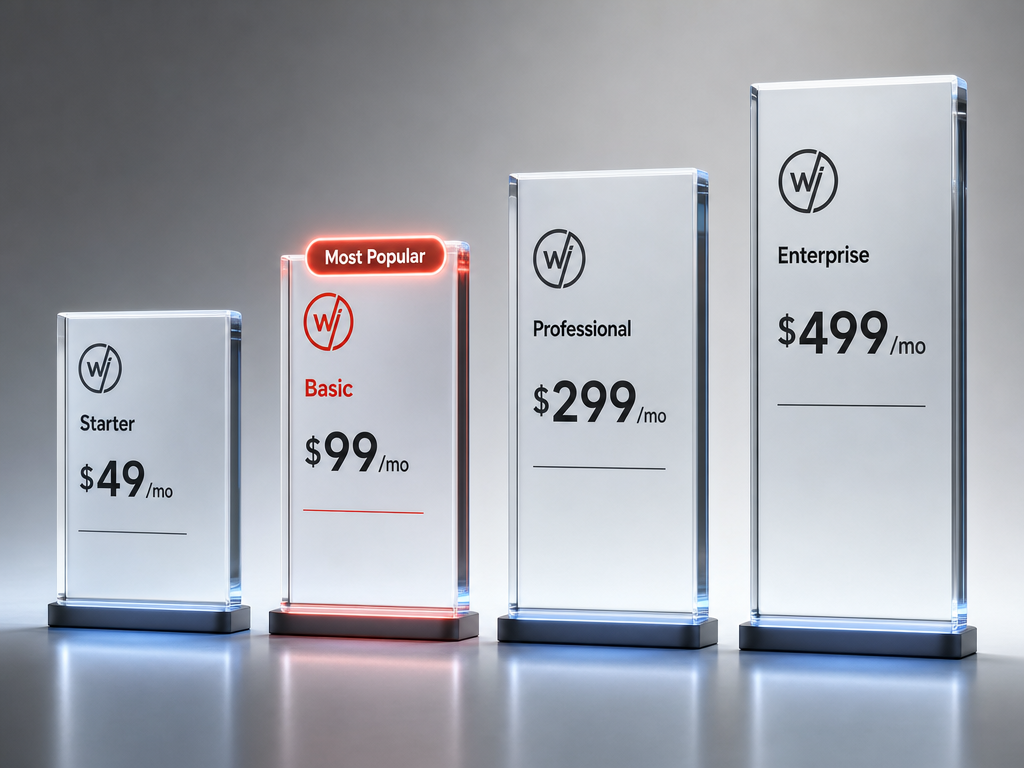
WebinarJam’s four plans scale by attendee capacity, host count, and session length — not by locking core features behind higher tiers. Live chat, flexible scheduling, customizable pages, the email/SMS system, live offer displays, polls, video injections, Facebook/YouTube broadcasting, and A/B split testing are included on every plan, Starter included.
- Starter — $49/mo: 100 attendees, 1 host, 1-hour sessions, 1 additional team member. Live-only — no Automated Webinars.
- Basic — $99/mo (Most Popular): 500 attendees, 2 hosts, 2-hour sessions, 5 additional team members. Includes Automated Webinars via EverWebinar at no extra cost.
- Professional — $299/mo: 2,000 attendees, 4 hosts, 3-hour sessions, 10 additional team members. Automated Webinars included.
- Enterprise — $499/mo: 5,000 attendees, 6 hosts, 4-hour sessions, 25 additional team members. Automated Webinars included.
All plans can be billed monthly or annually, with annual billing saving up to 24% — for example, $120/year saved on Starter and up to $1,440/year saved on Enterprise. Every tier starts with a $1, 14-day trial, backed by a 30-day money-back guarantee if purchased and found not to be a fit.
The practical takeaway: if automation is part of the plan at all, Basic is the realistic starting point, not Starter. Paying $49/mo for a live-only tier and later needing to jump to $99/mo for automation is a common upgrade path worth anticipating upfront rather than discovering later.
How It Stacks Up
Against dedicated webinar platforms like Demio or EasyWebinar, WebinarJam holds its ground on raw capability — attendee limits, host count, and offer tools are competitive — but loses ground on interface polish and AI-assisted extras that newer tools now include by default.
Against its own sister product, EverWebinar, the comparison isn’t really a competition anymore for most buyers — it’s a bundle. From Basic up, both live and automated formats live under one WebinarJam subscription, which simplifies a decision that used to require pricing out two separate products. The Starter plan is the exception, and it’s worth choosing deliberately, not by default.
Within a broader online business stack, WebinarJam occupies a specific slot: the moment where a written offer becomes a spoken, defended pitch in front of real prospects, with a path to automating that same pitch once it’s proven. It’s not a course platform, a CRM, or an AI content tool, and it shouldn’t be evaluated against those categories.
Final Verdict
WebinarJam remains one of the most proven names in live webinar marketing — and in 2026, it’s arguably a smarter buy than ever. From the Basic plan up, the platform doesn’t just handle live presentations; it hands that same webinar straight into automated, evergreen delivery through EverWebinar, at no extra cost. That’s two proven products working as one, without the friction of stitching together separate tools.
For any course creator, coach, or marketer ready to put a real offer in front of a real audience, WebinarJam gives everything needed to do it well: registration, reminders, live engagement, offers, and a replay funnel that keeps converting after the event ends. Choosing Basic or above from day one means that same webinar can scale into an always-on sales asset with zero extra setup.
Backed by a $1, 14-day trial and a 30-day money-back guarantee, there’s very little standing between testing the platform and putting it to work. For a funnel that depends on a strong live pitch, WebinarJam is a safe, established choice to build on in 2026.
See how WebinarJam fits into a broader online business tool stack built for AI-driven funnels in 2026.
Frequently Asked Questions
Does WebinarJam include automated or evergreen webinars?
Yes, but only from the Basic plan ($99/mo) upward — Automated Webinars via EverWebinar are bundled in at no extra cost on Basic, Professional, and Enterprise. The Starter plan ($49/mo) is live-only.
How much does WebinarJam actually cost per year?
Pricing scales by attendee capacity, from $49/month on Starter to $499/month on Enterprise, with annual billing saving up to 24% depending on the plan. A $1, 14-day trial is available on sign-up.
Is the $1 trial safe to cancel if it’s not a fit?
WebinarJam offers an official 30-day money-back guarantee, but independent reviews report friction during the trial-to-paid transition and cancellation process. Reading the official billing policy and setting a reminder before the trial ends is a reasonable precaution.
Who should NOT buy WebinarJam?
Solo creators testing a small list on a tight budget, and anyone expecting AI-assisted features or a fully modern interface, are likely better served by a lighter or newer alternative. It’s priced and built for funnels that already have some traction.
Do I need to buy EverWebinar separately to automate my webinars?
No — as long as you’re on the Basic plan or higher, Automated Webinars through EverWebinar are already included. Only Starter-tier customers would need to upgrade to unlock that feature.
About the Author
Lydia — Salles & Co. Digital
Lydia writes about digital products, AI-powered tools, and online business infrastructure for creators building sales funnels from scratch. Her focus is matching the right tool to the right stage of the funnel, rather than chasing whatever launches next.
Some links may be affiliate links, meaning she may earn a commission at no additional cost to you.